15+ Best Free n8n Workflows and Automation | Ideas for 2026
Repetitive digital work quietly eats up hours every week. You copy leads into spreadsheets, sort emails, create reports, move files, update customer records, and then wonder where the day went.
That is exactly where n8n workflows can make a difference.
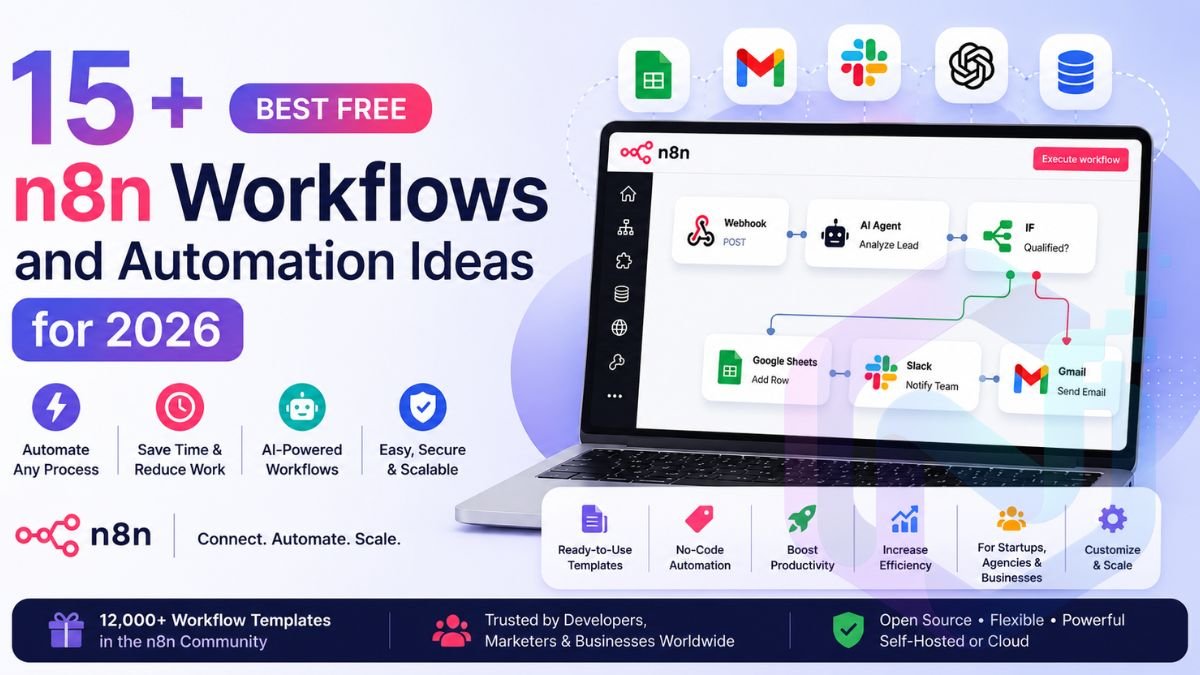
n8n is a visual workflow automation platform that connects applications, APIs, databases, AI models, and business tools. Instead of performing the same sequence manually, you can design it once and let the system handle the routine work.
The good news is that you do not have to build everything from an empty canvas. n8n’s official community library currently lists more than 12,000 workflow automation templates covering areas such as AI, sales, marketing, IT operations, document processing, and customer support.
In this guide, we will explore the best free n8n workflows for beginners, marketers, developers, freelancers, agencies, startups, and small businesses in the USA. You will also learn how to choose templates, customize them, make them safer, and turn simple automations into reliable business systems.
What Is n8n Workflow Automation?
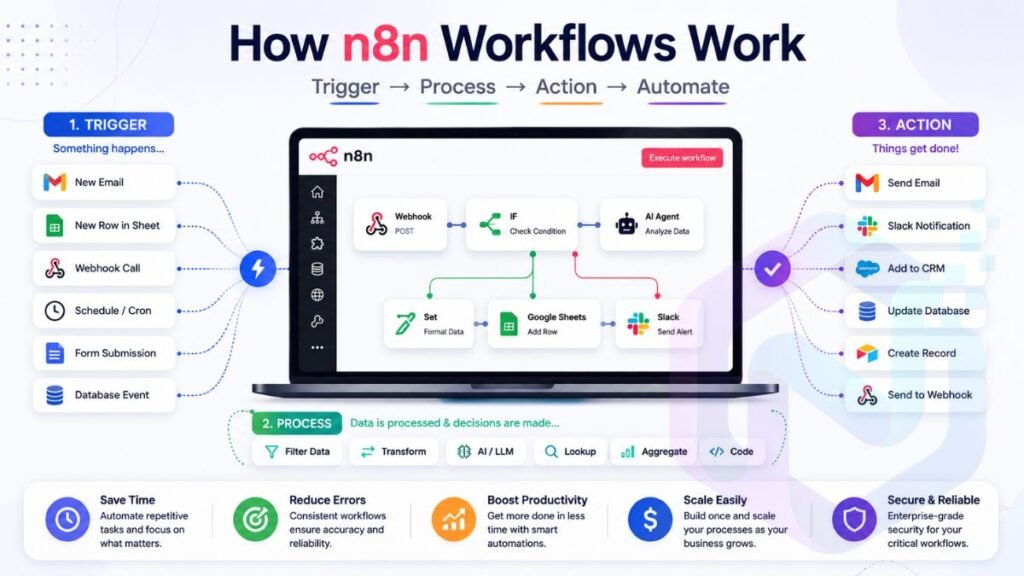
n8n workflow automation connects individual tasks into a sequence that can run automatically. A trigger starts the process, n8n processes the information, and one or more actions produce the final result.
Imagine receiving a website inquiry.
Normally, you might open the email, read the message, copy the customer’s information into a spreadsheet, notify your salesperson, and send a reply.
With n8n, the same process could become:
Website form → Webhook → AI classification → Lead scoring → CRM → Slack → Email
That is the basic idea behind workflow automation.
n8n gives you a visual workflow editor where each node represents a task or operation. You can connect nodes together and create conditional paths, data transformations, API requests, database operations, notifications, and AI-powered steps.
| No. | n8n Workflow | Main Role | Best For | Difficulty |
|---|---|---|---|---|
| 1 | AI Email Triage | Sorts and prioritizes incoming emails | Businesses & teams | Beginner |
| 2 | AI Lead Qualification | Scores and routes potential leads | Sales teams | Intermediate |
| 3 | Contact Form Automation | Sends and organizes website inquiries | Websites & businesses | Beginner |
| 4 | Client Onboarding | Automates new-client setup | Agencies & freelancers | Intermediate |
| 5 | AI Agent | Creates an AI-powered automated assistant | AI automation | Intermediate |
| 6 | Gmail Intent Classification | Identifies the purpose of emails | Email management | Beginner |
| 7 | Automated Gmail Labeling | Organizes emails automatically | Gmail users | Beginner |
| 8 | Customer Feedback Routing | Sends feedback to the right team | Customer support | Beginner |
| 9 | Daily Business Report | Creates recurring business summaries | Small businesses | Intermediate |
| 10 | AI Content Research | Collects and processes research | Content creators | Intermediate |
| 11 | Social Media Monitoring | Tracks mentions and relevant activity | Marketing teams | Intermediate |
| 12 | Document Processing | Extracts and processes document data | Operations teams | Intermediate |
| 13 | Google Sheets Automation | Adds, updates, and processes spreadsheet data | Businesses | Beginner |
| 14 | CRM Lead Updates | Keeps customer and lead records updated | Sales teams | Intermediate |
| 15 | Webhook Automation | Triggers workflows from external events | Developers & businesses | Intermediate |
| 16 | Daily Research Digest | Collects information into one summary | Researchers & professionals | Beginner |
| 17 | AI Customer Support Routing | Classifies and routes support requests | Support teams | Intermediate |
The platform also supports more technical approaches when you need them. Its current pricing documentation highlights capabilities including code steps, custom API requests, webhooks, CLI control, and custom nodes in self-hosted environments.
🚀 Turn Your Ideas Into Articles Faster
Need to turn your research and ideas into a complete article? Try the free AI Article Generator from GenAi Nexo to create a structured first draft and speed up your content workflow.
Try the Free AI Article Generator →How Do n8n Workflows Actually Work?
An automation normally begins with a trigger.
The trigger could be a new Gmail message, a scheduled time, a webhook request, a new spreadsheet row, a database event, or another application event.
After that, the workflow processes the incoming information. It might clean the data, check conditions, ask an AI model to classify it, look something up in a database, or transform it into another format.
Finally, n8n performs one or more actions.
A simple workflow might therefore look like this:
| Stage | Example |
|---|---|
| Trigger | New website form |
| Processing | Extract customer information |
| Decision | Is the lead qualified? |
| Action | Add lead to CRM |
| Notification | Alert salesperson |
| Follow-up | Send confirmation email |
This modular structure is what makes n8n different from a single-purpose integration. You are not merely connecting two applications. You are designing an entire process.
Are Free n8n Workflows Really Free?
The word free needs a little context.
Many templates in the official n8n library are free to use. However, the services connected to those templates can have their own pricing, API limits, or subscription requirements.
For example, an automation might be free from a template perspective while using a paid AI API. Your n8n workflow may cost nothing to download or customize, yet the external AI provider could charge according to usage.
n8n currently offers hosted plans as well as self-hosted options. Its pricing page also states that a standard self-hosted Community Edition is available.
For USA-based businesses, this distinction matters because automation costs can grow alongside usage.
| Cost Area | What to Consider |
|---|---|
| n8n template | Many community templates are free |
| n8n hosting | Depends on Cloud or self-hosting |
| AI models | May charge per usage |
| Email APIs | May have sending limits |
| Database | Depends on provider |
| Third-party SaaS | May require subscription |
| Server | Relevant for self-hosting |
So, think of a free workflow as a free blueprint rather than a promise that every connected service costs nothing.
15+ Best Free n8n Workflows for 2026
The strongest n8n automations solve a real problem instead of merely looking impressive in a screenshot.
For this list, the focus is practical usefulness. The workflows cover email, sales, customer support, content, reporting, AI, webhooks, spreadsheets, CRM systems, and other everyday processes.
They also demonstrate different automation patterns. That matters because learning one good pattern can help you build dozens of other workflows later.
1. AI-Powered Email Triage Workflow
Your inbox is probably one of the easiest places to discover an automation opportunity.
An AI email triage workflow can inspect incoming messages, understand their intent, identify urgent requests, draft responses, and send important messages to the right person.
n8n’s template library includes workflows that combine Gmail with AI, Slack, Google Sheets, and other services to classify messages and route urgent emails.
A typical process might look like:
Gmail → AI analysis → Classification → Decision → Action
Suppose a customer sends an angry message about a failed order. The workflow can recognize that it is a support issue and potentially urgent.
A newsletter, meanwhile, can receive a completely different treatment.
The real benefit comes from removing the sorting work rather than blindly responding to everything.
Who Should Use AI Email Automation?
This type of automation works particularly well for consultants, agencies, sales teams, support departments, founders, and professionals who receive large volumes of email.
You can also create separate rules for customers, suppliers, employees, recruiters, invoices, partnerships, and sales inquiries.
That makes the workflow considerably more useful than a simple “AI reads my email” experiment.
2. AI Lead Qualification Workflow
A lead sitting inside a spreadsheet is not particularly valuable. A lead that reaches the right salesperson at the right time is.
One of the strongest n8n automation ideas is automatically evaluating incoming prospects.
The workflow can receive a form submission, extract important information, ask an AI model to evaluate the prospect, assign a score, and route the result.
For example, a software agency might evaluate a prospect based on company size, project budget, service requirements, and expected start date.
The result could look like this:
| Lead Score | Classification | Suggested Action |
|---|---|---|
| 8–10 | High intent | Notify sales immediately |
| 5–7 | Medium intent | Add follow-up task |
| 1–4 | Low intent | Add to nurture sequence |
n8n’s official template library contains lead qualification workflows that use AI, Gmail, Slack, and Google Sheets to score and route inbound prospects.
This is a strong example of business workflow automation because it connects marketing activity with sales operations.
3. Website Contact Form Automation
A contact form should not simply deliver an email and disappear into your inbox.
With n8n, you can turn that form into the beginning of an automated customer journey.
The process might start when someone submits a form on your website. n8n receives the information through a webhook, validates the fields, analyzes the request, stores the data, alerts your team, and sends a confirmation.
The architecture can be simple:
Website → Webhook → Validation → AI classification → CRM → Notification → Email
This type of pre-built automation is particularly useful for agencies and small businesses.
Imagine a web design company receiving a request from a potential client. Instead of manually reviewing every submission, the workflow can identify the service requested and send the lead into the appropriate sales pipeline.
The human still makes the important decision. n8n simply removes the administrative shuffle around it.
4. Automated Client Onboarding Workflow
Client onboarding is full of small tasks that rarely require human creativity.
You collect the client’s information, create a folder, add a record, send a welcome email, notify your team, create tasks, and schedule follow-ups.
That makes onboarding an excellent candidate for business process automation.
A typical workflow could look like:
Client form → AI summary → Client record → Google Drive folder → Team notification → Welcome email
You can then add a delayed follow-up several days later.
For an agency, this can create a consistent onboarding experience without forcing an employee to remember every step.
The important part is consistency. Your tenth client should receive the same organized process as your first client.
5. Build an AI Agent With n8n
AI agents are among the most interesting n8n workflow examples because they move beyond simple text generation.
n8n’s official template library includes a beginner-focused AI agent workflow that demonstrates a chatbot capable of using tools and taking actions.
A basic agent architecture looks like this:
User → AI Agent → Tool Selection → External Data or Action → Response
The agent might retrieve information from a database, call an API, search connected information, or perform another permitted task.
For example, a company could build an internal assistant that answers questions about its own documentation.
A more advanced system could allow the assistant to check records, create tasks, or trigger other workflows.
However, do not start with a giant agent containing twenty tools.
Begin with one clear job.
Give it a narrow purpose, test its behavior, and add capabilities only when they provide measurable value.
6. Gmail Intent Classification Workflow
Not every email belongs in the same bucket.
A customer complaint requires different treatment from an invoice. A meeting request differs from a newsletter. A security notification should not be treated like ordinary correspondence.
An n8n Gmail classification workflow can use AI to determine the intent of each incoming message.
The resulting structure might look like:
| Email Intent | Automated Response |
|---|---|
| Customer complaint | Notify support |
| Sales inquiry | Create sales task |
| Invoice | Save or forward |
| Meeting request | Create task |
| Newsletter | Apply label |
| Urgent message | Immediate notification |
This is a good example of AI-powered automation because the AI interprets the message while n8n handles the predictable routing.
That division of labor is important.
AI handles ambiguity. Traditional automation handles rules.
7. Automated Gmail Labeling
Email classification can also be used to organize your inbox automatically.
Instead of manually creating Gmail labels and dragging messages into folders, n8n can analyze messages and apply labels according to your rules.
You might create labels for customers, prospects, invoices, partnerships, support, newsletters, and urgent requests.
The workflow can then record what happened in a spreadsheet or database.
This becomes especially useful when multiple people follow the same communication process.
Rather than relying on everyone’s personal inbox habits, you create a shared information structure.
That is one of the quiet advantages of automated workflows: they make a process repeatable.
8. Customer Feedback Routing Automation
Customer feedback becomes much more useful when it reaches the right person.
Suppose your SaaS company receives a hundred feedback messages in one month. Some describe bugs. Others request features. Some praise the product. A few may require immediate attention.
An n8n workflow can classify each submission and route it accordingly.
Feedback → AI analysis → Category → Correct destination
A bug can go to engineering. A feature request can reach product management. A positive review can be shared with marketing.
You can also record the information in a database for future analysis.
Over time, this creates a searchable feedback archive instead of a pile of disconnected emails.
That is a practical example of process automation producing better information rather than simply saving clicks.
9. Automated Daily Business Report
Reports are useful. Building them manually every afternoon is not.
A scheduled n8n workflow can gather information from spreadsheets, databases, CRMs, analytics tools, or other applications.
It can then calculate basic metrics, generate a summary, and deliver the result through email or Slack.
A typical architecture is:
Schedule → Collect data → Calculate → Summarize → Send report
For example, a small business might generate a daily report showing new leads, completed sales, unresolved support issues, and pending tasks.
An operations manager could receive the report every morning without asking an employee to assemble it.
This is one of the simplest ways to introduce business automation because the process has a clear beginning, predictable inputs, and a defined output.
10. AI Content Research Workflow
Content teams spend enormous amounts of time gathering information before writing anything.
n8n can help organize that research.
A content research workflow might collect information from RSS feeds, APIs, spreadsheets, databases, or approved sources. It can filter irrelevant material, remove duplicates, summarize useful information, and store the results.
The workflow could follow this pattern:
Sources → Filter → Deduplicate → AI summary → Research database
For an SEO team, the database could contain the topic, source, publication date, keyword, summary, content angle, and review status.
The crucial point is that automation should assist research rather than replace fact-checking.
AI can summarize information quickly. Humans should still verify important claims before publication.
That combination produces a much stronger content operation.
11. Social Media Monitoring Workflow
Social media monitoring is another natural use case for automation workflows.
Instead of checking several sources manually, you can collect relevant mentions and organize them into one system.
A monitoring workflow can search approved feeds or APIs, filter for specific terms, classify the result, and notify your team.
For example, a software company might monitor its brand name, product names, competitor mentions, and important industry phrases.
You could then create a daily summary rather than sending an alert for every single mention.
This approach reduces notification fatigue.
The goal is not to automate every interaction. The goal is to make important conversations easier to discover.
💡 Create Better AI Prompts Faster
Need a better prompt for your AI workflow? Try the free AI Prompt Generator from GenAi Nexo to create clear and effective prompts for your AI tasks, content, automation, and everyday work.
Try the Free AI Prompt Generator →12. Document Processing Automation
Businesses process enormous amounts of documents.
Invoices, applications, receipts, forms, reports, and contracts often contain information that eventually needs to enter another system.
n8n can become the bridge.
A document automation workflow could receive a file, extract information, validate the extracted fields, store structured data, and notify an employee when review is required.
The architecture might look like:
Document → Extraction → Validation → Database → Notification
AI can be particularly useful when the document structure changes from one file to another.
However, document workflows require extra care when handling confidential business information.
Before connecting sensitive documents to an external AI provider, review the provider’s terms, data handling, security requirements, and your organization’s policies.
13. Google Sheets Automation
Google Sheets may look simple, but it is often the hidden database behind a small business.
Teams use spreadsheets to track leads, projects, inventory, content, customers, expenses, and campaigns.
That makes Google Sheets an excellent starting point for no-code automation.
For example:
New spreadsheet row → Validate data → Remove duplicate → Update CRM → Notify team
You could also synchronize information between different sheets.
Suppose your marketing team maintains leads in one spreadsheet while sales uses another system. n8n can help keep those systems synchronized.
As your business grows, you may eventually move the process into a proper database. Until then, a well-designed automation can make spreadsheet-based operations considerably less tedious.
14. CRM Lead Update Automation
A CRM is only useful when its information stays current.
Unfortunately, salespeople often spend too much time manually updating records.
n8n can connect forms, emails, spreadsheets, databases, and CRM platforms so important events update customer records automatically.
A typical workflow might be:
New lead → Find contact → Update CRM → Create task → Notify salesperson
You can also create rules for stale leads.
For example, if a prospect has not received a follow-up for a certain period, n8n could create a reminder.
This turns your CRM into a more active system rather than a database that employees remember to update occasionally.
15. Webhook Automation Workflow
Webhooks are one of the most useful building blocks for developers.
A webhook allows another application to send information to an n8n endpoint when an event occurs.
For example, a payment system could notify n8n after a transaction. n8n could then validate the information, update a database, notify the finance team, and send a customer confirmation.
The process might look like:
External event → Webhook → Validation → Database → Notification → Customer message
This approach allows n8n to communicate with systems that may not have a direct native integration.
For developers, webhooks can become the connective tissue between otherwise separate applications.
16. Automated Daily Research Digest
Information overload is a real productivity problem.
Instead of opening dozens of websites every morning, you can create a personalized research digest.
The workflow can collect information from approved sources, filter it using keywords, remove duplicate stories, summarize useful material, and send one organized digest.
For an SEO professional, that might mean monitoring search updates and content marketing news.
For a developer, it could mean following selected technology feeds.
For a founder, it could mean tracking industry news and competitor announcements.
The trick is specificity.
A narrow research workflow usually produces a much more useful digest than one that tries to monitor everything.
17. AI Customer Support Routing
Customer support can become complicated quickly.
One customer needs a simple answer. Another reports a billing problem. Someone else has a technical issue. A high-value customer may require immediate attention.
An AI-powered support workflow can classify incoming requests, summarize them, determine urgency, and send them to the appropriate destination.
The workflow might look like:
Support message → AI classification → Urgency check → Ticket → Team notification
You can also create a human approval stage.
For sensitive complaints, refunds, account changes, or unusual requests, the workflow can stop and wait for an employee.
This is often better than trying to automate every decision.
Good workflow solutions do not remove humans from every process. They place humans where judgment matters most.
Best n8n Workflows by Use Case
Choosing a best n8n workflow becomes easier when you start with the problem rather than the technology.
| Your Goal | Useful n8n Workflow |
|---|---|
| Organize email | AI email classification |
| Capture leads | Contact-form automation |
| Qualify prospects | AI lead scoring |
| Improve onboarding | Client onboarding |
| Automate reports | Scheduled reporting |
| Research content | AI research pipeline |
| Monitor conversations | Social monitoring |
| Process documents | Document extraction |
| Update CRM | CRM synchronization |
| Connect applications | Webhook automation |
| Handle feedback | Feedback routing |
| Build an assistant | AI agent |
The important lesson is that n8n automation does not need to begin with something complicated.
A two-node workflow that saves you an hour every week can be more valuable than an impressive AI agent that nobody actually uses.
Best n8n Workflows for Beginners
If you are completely new to n8n, start with predictable processes.
A simple form-to-email workflow teaches you how triggers and actions work. A webhook-to-Slack workflow introduces external events. A Google Sheets workflow teaches you how data moves between applications.
After that, add conditions.
Once you understand IF and Switch logic, you can create different paths for different situations.
Then introduce APIs and AI.
This progression gives you a practical understanding of low-code automation without forcing you to learn every advanced feature immediately.
A sensible learning path is:
- Build one trigger and one action.
- Add a second action.
- Introduce conditional logic.
- Transform incoming data.
- Connect an API.
- Add an AI model.
- Add error handling.
- Monitor the finished automation.
By the time you reach the final stage, complicated templates become much easier to understand.
How to Find Free n8n Workflow Templates
The official n8n template library is the obvious place to begin.
At the time of writing, the library displays more than 12,000 automation workflows and allows visitors to browse by categories and applications. Current categories include AI, sales, IT operations, marketing, document operations, and support.
You can also search around the applications already present in your business.
For example, if your company uses Gmail and Slack, search for workflows involving those applications. If your sales team works with a CRM and Google Sheets, start there.
The library also contains templates designed for newcomers.
That means you can learn by modifying a functioning example rather than staring at a blank canvas.
Search by Problem Instead of App
This is an underrated strategy.
Instead of searching only for “Gmail automation,” search for a business outcome such as lead qualification, customer support, email triage, content research, or invoice processing.
You will often discover workflow templates that solve the actual problem rather than merely connecting two applications.
How to Choose the Right n8n Template
A template can look brilliant in a screenshot and still be completely wrong for your business.
Before importing one, examine the trigger, credentials, external services, data flow, AI requirements, and final actions.
Ask yourself whether the template actually matches the process you want to automate.
A good template should reduce your workload after customization. It should not replace one tedious task with five new maintenance tasks.
| Question | Why It Matters |
|---|---|
| What triggers the workflow? | Determines when it runs |
| What data does it access? | Helps evaluate privacy |
| Which credentials are required? | Reveals setup complexity |
| Does it use paid APIs? | Helps estimate cost |
| Does it contain AI? | May affect reliability and cost |
| What happens after failure? | Indicates resilience |
| Can you customize it? | Determines long-term usefulness |
| Does it handle duplicates? | Prevents repeated actions |
Treat pre-built workflows as starting points.
You should understand what they do before giving them access to important accounts.
How to Import and Customize an n8n Workflow
Importing a template is only the beginning.
First, examine every node and understand what information enters and leaves it.
Next, connect your credentials. Replace placeholder IDs, email addresses, spreadsheet references, prompts, and other configuration values.
Then test the workflow with fake or low-risk data.
A useful testing sequence is:
- Import the workflow.
- Inspect each node.
- Connect required credentials.
- Replace placeholder values.
- Run a controlled test.
- Inspect every output.
- Test an error condition.
- Add safeguards.
- Activate the workflow.
- Monitor its first real executions.
This process may seem slower than clicking “activate” immediately.
It is much faster than repairing a broken production workflow after it sends hundreds of incorrect emails.
n8n Workflow Templates vs Building From Scratch
There is no universal winner.
Ready-to-use workflows are excellent when you want to move quickly. Building from scratch makes more sense when your business process is unusual or highly customized.
| Factor | Template | From Scratch |
|---|---|---|
| Setup speed | Fast | Slower |
| Learning curve | Lower | Higher |
| Customization | High | Maximum |
| Best for beginners | Yes | Not always |
| Control | Strong | Complete |
| Development effort | Lower | Higher |
The smartest approach is often somewhere between the two.
Find a suitable template and rebuild or modify the sections you understand.
That way, you get the speed of a template while learning how the underlying n8n workflow automation actually works.
What Are n8n JSON Templates?
n8n workflows can be represented as JSON configuration containing nodes, connections, settings, and other workflow information.
That makes JSON useful for sharing and moving workflows.
However, importing JSON does not mean your credentials and business-specific settings automatically become correct.
You may still need to connect accounts, replace IDs, update prompts, change URLs, configure databases, and review permissions.
Think of an n8n JSON template like a machine blueprint.
The blueprint describes how the machine should be assembled. It does not automatically provide your electricity, raw materials, or operating environment.
Always inspect imported workflow JSON before using it in a production environment.
How to Make n8n Workflows Production-Ready
A workflow that works once is not necessarily ready for real business traffic.
Production automation needs safeguards.
Start with input validation. If your workflow expects an email address and receives an empty value, downstream nodes should not blindly continue.
Then consider failure handling.
What happens if an API becomes unavailable? What happens if an AI response has an unexpected format? What happens if the same webhook arrives twice?
These questions matter because automated systems can repeat mistakes much faster than humans.
A useful production architecture is:
Trigger → Validate → Process → Verify → Action → Log
The verification stage is particularly valuable.
Suppose an AI model should return structured JSON. Before the workflow continues, check whether the expected fields actually exist.
That small checkpoint can prevent one malformed response from breaking everything downstream.
Error Handling and Duplicate Prevention
Reliable automated workflows need to expect failure.
Networks fail. APIs time out. Users submit incomplete information. Services change their responses. Occasionally, a workflow runs twice.
You should therefore design for imperfect conditions.
For important processes, consider retry behavior, error notifications, duplicate checks, logging, and fallback paths.
For example, before creating a new CRM record, search for an existing contact using a unique identifier such as an email address.
That simple check can prevent thousands of duplicate records over time.
Security and Privacy Considerations
Automation often connects your most valuable systems.
An n8n workflow may have access to email accounts, customer records, databases, internal documents, or business APIs.
That access should be treated seriously.
Use credentials rather than hardcoding sensitive keys inside nodes. Limit access to only what the workflow actually needs. Review where information is sent, especially when AI services are involved.
For US businesses, privacy and compliance requirements can vary considerably by industry and state.
A healthcare company, financial organization, and ordinary marketing agency may face very different obligations.
The safest approach is to understand the data involved before automating it.
Cloud vs Self-Hosted n8n
Your deployment choice can affect cost, maintenance, control, and technical responsibility.
n8n currently offers hosted Cloud plans as well as self-hosted options. Its pricing documentation says Cloud plans are hosted by n8n while certain Business and Enterprise configurations are available for self-hosted deployments.
Self-hosting gives you greater control over the environment. It also means you become responsible for server maintenance, updates, security, backups, and availability.
For a technically comfortable user, that control can be valuable.
For someone who simply wants automation to work without managing infrastructure, a hosted option may be more convenient.
The right choice depends on your technical ability and operational requirements.
Common n8n Automation Mistakes
The biggest mistake is automating a process that nobody has clearly defined.
If the manual process is confusing, automation will not magically fix it. It may simply make the confusion happen faster.
Another common problem is using AI where a basic condition would be more reliable.
If the rule is “orders above $500 require review,” you do not need an AI model.
Use a normal condition.
If the task is “understand whether this customer is asking for a refund,” AI may be useful.
That distinction keeps your workflows simpler and cheaper.
How to Build Your Own n8n Automation
Start by finding one repetitive task that happens frequently.
Write down exactly what happens today.
Then identify the event that starts the process. That becomes your trigger.
Next, map the decisions and actions.
For example:
New lead → Validate email → Check existing customer → Score lead → Update CRM → Notify sales
Once the basic process works, add error handling.
Then measure the result.
If the workflow saves ten minutes per lead and your company processes 100 leads each month, you have a measurable efficiency improvement.
That is much more useful than saying an automation is “cool.”
Best n8n Automations for Small Businesses
Small businesses should focus on repetitive work that happens frequently and does not require constant human judgment.
Lead capture is an obvious candidate.
Customer onboarding is another.
Email organization, reporting, CRM updates, appointment notifications, document processing, and feedback routing can also provide quick wins.
The goal should not be to automate the entire company overnight.
Pick one bottleneck.
Fix it.
Then move to the next one.
This approach makes business process automation easier to manage because each new workflow has a clear purpose.
Best n8n Workflows for AI Automation
AI adds the most value when the workflow needs to understand information.
Email classification is a good example.
Lead scoring is another.
Document extraction, customer feedback analysis, summarization, research, and AI agents can also benefit from AI.
Traditional automation remains better for deterministic operations.
For example, moving a row from one database table to another does not require an AI model.
A useful rule is simple:
Use automation for certainty. Use AI for interpretation.
Combining both produces powerful AI-powered automation without unnecessarily complicating every workflow.
A Simple n8n Automation Roadmap
If you want to become comfortable with n8n, progress gradually.
| Level | What to Learn | Example |
|---|---|---|
| 1 | Trigger + action | Form → Email |
| 2 | Multiple actions | Form → Email → Sheet |
| 3 | Conditions | Lead → Score → Route |
| 4 | Data transformation | Clean customer data |
| 5 | APIs | Webhook → External API |
| 6 | AI | Email → Classification |
| 7 | Reliability | Validation + retries |
| 8 | Production | Monitoring + documentation |
This progression prevents the classic beginner mistake of downloading a massive workflow and having no idea why it works.
A Practical Case Study: Automating a Small US Agency
Consider a fictional US marketing agency that receives around 30 website inquiries each week.
Before automation, an employee reads every inquiry, copies the information into Google Sheets, forwards good leads to sales, creates a folder, and sends a welcome email.
The process might consume several hours every week.
The agency could instead build:
Contact form → n8n webhook → Validation → AI lead classification → Google Sheets → CRM → Slack → Email
The workflow handles the repetitive administration.
The sales employee still reviews qualified prospects.
The agency therefore does not replace the human part of sales. It removes the paperwork surrounding it.
That distinction is important.
Good automation should make employees more effective rather than simply trying to eliminate human involvement.
Are n8n Templates Safe to Use?
Templates can be useful, but you should treat them like code downloaded from the internet.
Read the workflow before activating it.
Check the applications it connects to. Review HTTP requests. Examine external URLs. Understand what data gets passed between nodes.
Be particularly careful with workflows that request broad access to email, cloud storage, databases, or financial systems.
A template can be technically legitimate while still being inappropriate for your particular environment.
Security begins with understanding what you are running.
Are n8n Workflows Production-Ready?
Some community templates can provide excellent foundations. However, you should not assume that every template is production-ready simply because it works during a demonstration.
Production systems require testing, monitoring, validation, error handling, security controls, and appropriate documentation.
n8n’s current pricing and documentation also emphasize execution-based usage and workflow management capabilities across its plans.
Before moving an important workflow into production, test it with realistic data.
Then deliberately make things fail.
Disable an API.
Send incomplete information.
Submit duplicate data.
See what happens.
A workflow that survives those tests is much more trustworthy than one that only works when everything goes perfectly.
Frequently Asked Questions About Free n8n Workflows
Is n8n free to use?
n8n provides a self-hosted Community Edition alongside paid hosted and advanced plans. The cost of running a particular automation can also depend on your hosting environment and connected third-party services.
Where can I find free n8n workflow templates?
The official n8n workflow library is the best starting point. It currently lists more than 12,000 workflow automation templates across categories such as AI, sales, marketing, IT operations, document operations, and support.
What are the best n8n workflows for beginners?
Start with a simple form, webhook, spreadsheet, or email automation. Once you understand triggers and actions, move into conditions, APIs, and AI.
Can beginners use n8n without coding?
Yes. Many workflows can be created through n8n’s visual interface. Coding becomes more useful when you need custom transformations, advanced API interactions, or specialized logic.
Can n8n automate business processes?
Yes. n8n can connect business applications, databases, APIs, email systems, spreadsheets, CRMs, communication platforms, and AI services.
Can n8n work with AI?
Yes. The n8n template ecosystem includes AI agents, classification workflows, summarization systems, research workflows, and many other AI-focused use cases.
Are n8n workflow templates safe?
Templates should be reviewed before use. Check credentials, external requests, data handling, permissions, and every action performed by the workflow.
Can I import n8n JSON templates?
Yes. Workflow JSON can be imported and exported. You will normally need to configure your own credentials, application IDs, environment values, and other settings afterward.
Is self-hosted n8n free?
n8n currently makes a standard self-hosted Community Edition available. However, running your own server can still involve infrastructure, maintenance, backup, and other operational costs.
Is n8n good for small businesses?
Yes. Small businesses can use it for lead management, customer onboarding, email organization, reporting, CRM updates, document processing, and other repetitive processes.
What is the difference between n8n and traditional no-code automation?
n8n combines a visual workflow editor with deeper customization through APIs, webhooks, code, databases, and other technical capabilities. That makes it useful for both no-code automation and more advanced low-code systems.
Final Verdict: Which n8n Workflows Should You Try First?
The best free n8n workflows are not necessarily the most complicated ones.
If you are a beginner, start with a simple webhook, contact form, Gmail, or Google Sheets automation.
If you are a freelancer or agency, client onboarding can deliver immediate value.
If you work in sales, lead qualification and CRM updates are excellent candidates.
If you run marketing operations, content research and social monitoring can reduce repetitive research.
If you are a developer, webhook and API-based automation gives you enormous flexibility.
If you are interested in AI, start with classification or summarization before jumping into complex agents.
Most importantly, start with a problem you already have.
Find the task that makes you think, “I do this every single week.”
Automate that first.
Then measure what changed.
The official n8n library gives you thousands of pre-built workflows to study and customize. You do not need to reinvent every automation from scratch.


3 Comments
ahmad · September 22, 2026 at 11:38 pm
can u post about free guide on how to make free n8n workflows…..
genainexo@gmail.com · September 22, 2026 at 11:49 pm
will be soon, stay conected
20+ Best Free AI Tools in 2026 | The Ultimate Guide · September 9, 2026 at 2:25 am
[…] 15+ Best Free n8n Workflows and Automation | Ideas for 2026 […]